Off the Main Thread
How many Cores are on a Computer or Smartphone?
In case you are using a Mac, you can click on the top-left Apple Icon, then on "About this Mac" and it will show you something like:
Processor 3,2 GHz 8-Core Intel Xeon W
With the Apple silicon series even more: "Apple M2 Ultra" provides 24 CPU cores.
An iPhone has 6 CPU cores.
TL-BR: Every computer or smartphone has several cores available.
This means that you can run multiple threads concurrently.
Would you build a car using just one engine cylinder?
If your answer is "Of course not! It would be way slower!", then you should read this article carefully.
How many Cores does a Browser use?
On its own, a Browser will just use one core per tab / window.
Meaning: your Angular or React apps look like this:
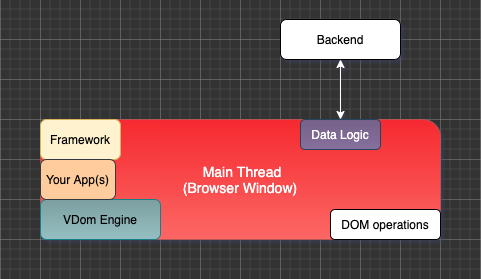
The more JavaScript tasks are running inside your app, the slower it will get. The worst scenario is a complete UI freeze where your one core is at 100% and all other cores are completely idle.
This is not scalable at all.
[Side note] In case you are creating simple, small and rather static websites or apps, this setup can be sufficient.
Web Workers API
Web Workers makes it possible to run a script operation in a background thread separate from the main execution thread of a web application. The advantage of this is that laborious processing can be performed in a separate thread, allowing the main (usually the UI) thread to run without being blocked/slowed down.
Source: MDN: Web Workers API
The W3C and WHATWG envision web workers as long-running scripts that are not interrupted by scripts that respond to clicks or other user interactions. Keeping such workers from being interrupted by user activities should allow Web pages to remain responsive at the same time as they are running long tasks in the background.
The simplest use of workers is for performing a computationally expensive task without interrupting the user interface.
Source: Wikipedia: Web worker
So, while JavaScript itself is single-threaded as a language, using workers enables us to use multiple cores concurrently and end this scalability nightmare.
Let the following quote really sink in:
The simplest use of workers is for performing a computationally expensive task without interrupting the user interface.
It leads to the question: "What is the most expensive task?"
The answer is simple: "An UI Framework or Library itself as well as the apps we build with it."
This is leading to the idea: Let us move everything we can out of the main thread, so that this one can purely focus on what it is intended to do: manipulating the DOM.
In case your apps are no longer running in main, there is nothing left which can slow down or block your UI or create memory leaks.
This thought is leading to the following concept:
The "An Application Worker being the Main Actor" Paradigm
Surma wrote a very nice article on how the Actor Model can and should get applied to the web here in 2017. At this point, we already had the Neo.mjs setup running, but sadly not open-sourced it yet.
It struck me that the Actor Model could work on the web. The more I thought about it, the more it seems like a natural fit.
In case you are not familiar with what an "actor" means, definitely read it first.
To resolve this performance bottleneck, we want to get main threads as idle as possible, so that they can fully focus on rendering / dynamically manipulating the DOM:
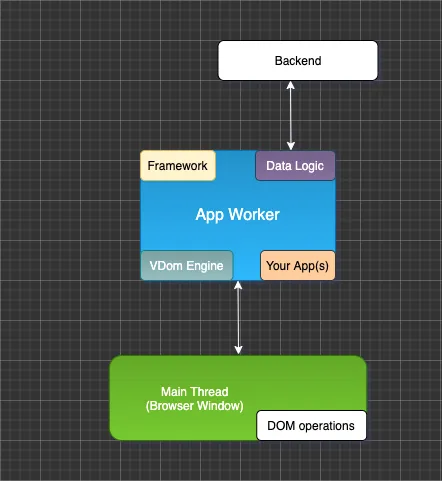
The worst case that could happen now is that your app worker will slow down and this core runs at 100%. However, this will not affect your UI (rendering thread → main). Probably the best solution for single page apps (SPAs) as well as multi-window apps (MWAs) looks like this:
To prevent the app worker from handling too much logic, we can optionally spawn more workers. Each thread has its fixed scope. Let us take a quick look into each of them.
Main Thread
The index.html file of your Neo.mjs App will by default have an empty body tag and only import the
MicroLoader.mjs file. The loader will fetch your neo-config.json and afterwards dynamically import the
main thread part of the engine. This part is as lightweight as possible: around 40KB in dist/production.
- Main will start the workers
- Main will apply delta-updates to the DOM
- Main will forward serialised DOM events to the App Worker
- Main can import Main Thread Addons (e.g. libraries which rely on direct DOM access)
The important part: Main is not aware of Neo.mjs Apps or Components. It is purely focussing on mounting and updating DOM nodes to ensure that literally nothing can slow down your UI or even freeze it.
This concept is called OMT (Off the Main Thread), and you can find quite a bunch of infos on the web.
Example-Overview: CSS-Tricks: Off the Main Thread
Application Worker
The most important actor is the App-Worker. After construction, it will lazy-load (dynamically import) your main App.
- Your App will import your used Components
- Meaning: your Component instances live within the App-Worker
- View Models & View Controllers also live here
- Most parts of the Neo.mjs Framework live here
- You can directly communicate with other Actors via remote method access (RPC)
As a developer, you will probably spend 95% of your time working within this actor.
There is a catch: Workers have by design no access to the DOM.
Meaning: window and window.document are undefined.
This enforces us to use an abstraction layer to describe the DOM (often called virtual DOM or vdom). Compared to other implementations like React, the Neo.mjs vdom is super lightweight. It is using a JSON-like syntax => just nested objects & arrays, since we need to be able to serialise it.
In German, we would call the concept "Kindersicherung" (parental controls), which has the benefit that we can ensure that junior developers can not mess up the real DOM with invalid operations.
Some libraries like SOLIDJS are claiming that using virtual DOM is a bad thing. They are referring to the React implementation of it, which is very different to the Neo.mjs approach. While the SOLIDJS concept to directly modify DOM nodes instead is charming in its own way, it does limit you for staying single-threaded. Their Components must live within the main thread.
Virtual DOM Worker
Like the main thread, the vdom-worker is not aware of your Apps or Components.
Every Component has a vdom tree (new state) and a vnode tree (current state).
Once we applied all our desired changes to the vdom tree, we can start an update-cycle. This is a triangle communication:
- The App-Worker will send the vdom & vnode trees to the VDom-Worker
- The VDom-Worker will transform the vdom tree into a vnode tree
- The VDom-Worker will compare the new & old vnode trees to calculate the required delta-updates (diffing)
- The VDom-Worker will send the deltas & the new vnode to the Main Thread
- Main will apply the deltas (piped through
requestAnimationFrame()) and pass the vnode to the App-Worker - At this point (async), the next update-cycle can start
If you think about it: This solves the problem of requiring an "immutable state tree" out of the box. We can modify vdom trees multiple times before starting an update-cycle. Once we do, the vdom gets serialised => immutable and sent to the VDom-Worker. We can immediately add new changes to the vdom, which will not interfere with the current update-cycle, but get used inside the next cycle.
Data Worker
The main responsibility of the Data-Worker is to communicate with the Backend / Cloud. Mostly, but not limited to:
- Ajax Calls
- SocketConnection messages
In case you are in need to apply expensive data-transformations before sending / after receiving data, these transformations should happen here. Think about the data reader / writer concept.
Canvas Worker
Can a Worker really not access the DOM?
There is one exception, which is called OffscreenCanvas.
Meaning: We can transfer the ownership of a Canvas DOM node to a worker.
This enables us to work with charting or maps libraries outside the App-Worker & outside the main thread.
Here is an example Blog-Post to show you how powerful this concept can be: Rendering 3d offscreen: Getting max performance using canvas workers
In the future, we might create an own OffscreenCanvas charting library for Neo.mjs.
Task Worker
In case you have specific expensive tasks, which don't really fit well into the other actors, you can optionally move them into the Task-Worker.
E.g. calculating Fibonacci numbers would be a good fitting example.
Service Worker
By design, Service-Workers are responsible for caching assets (Images, CSS, JS-bundles)
Service workers essentially act as proxy servers that sit between web applications, the browser, and the network (when available). They are intended, among other things, to enable the creation of effective offline experiences, intercept network requests, and take appropriate action based on whether the network is available, and update assets residing on the server. They will also allow access to push notifications and background sync APIs.
While Neo.mjs is not purely focussing on making the very first page load as fast as possible, it can make all following page loads happen almost instantly.
We can cache the JS bundles which generate the desired markup (HTML) directly on the client. There is no need to stream HTML again to the client (server side rendering => SSR), since we already have everything in place to recreate the fully hydrated version in the blink of an eye.
Via remote method access, the App-Worker can directly communicate with the Service-Worker at run-time. This enables us to preload / pre-cache assets on the fly.
More infos on this topic: Predictive offline support for assets you have not used yet