Custom Events
As you read in the Getting Started > Events topic, components, stores, and many other objects fire events.
Event listeners
In-line
The event listener function can be coded in-line. Normally you want event handlers to be in a view's controller, but for very simple situation it can be convenient to use this syntax.
As a view method
You can also use the up. qualifier to specify a method in the component's parent view. Like the
in-line syntax you saw above, using the up. syntax might be convenient for simple classees,
or when you simply haven't gotten around to defining a view's controller.
As a controller method
Despite the examples above, the most correct way of setting up event handlers is to use a controller. Any view class can specify a controller — wWhen the view is created a controller instance is also created.
Adding listeners procedurally
Event listeners are normally specified declarative, via the listeners: {} config. But occasionally you need to add
a listener procedurally.
Any observable class has an addListener method, along with an easier-to-type version called on.
The method specified in on() doesn't have to be an arrow function; you can use a controller function.
Events versus binding
Events and binding are similar concepts — both are a way to detect, and react to, some kind of action or change.
Events are fired for user actions, such as a button click event, a component receiving focus, or a field value changing.
Non-visual classes can also fire an event; for example, a Neo.data.Store fires a load event, and other events
relating to changes to the store. The event handler if a function run when the event fires.
A binding detects a changed view model value, and assigns it to a property.
When to use an event
Events and event handlers are used when you need to run non-trivial logic in response to the event. For example, you might have a Save button, and in its click event handler you'd write logic to make a backend call.
Events can be fired for a state change, such as an input field's value changing, or something like a user event, like a button click or component focus.
When to use a binding
A binding is a way to keep properties in sync with values in the view model hierarchy. For example, button text, field values, or store properties, can simultaneously reflect the same view model property. That's pretty handy, but keep in mind that a class can define a property as a lifecycle property. That means that updating a property can may result in complex logic being triggered. Furthermore, a two way binding means a change to a property will automatically be reflected in the view model.
A simple comparison
To contrast syntax, and to illustrate the simplicity of a binding, let's look at two exmaples of updating a component to reflect the value of a text field. THe first example uses events; the second uses bindings.
How are events set up?
The details don't really matter, but in case you're curious:
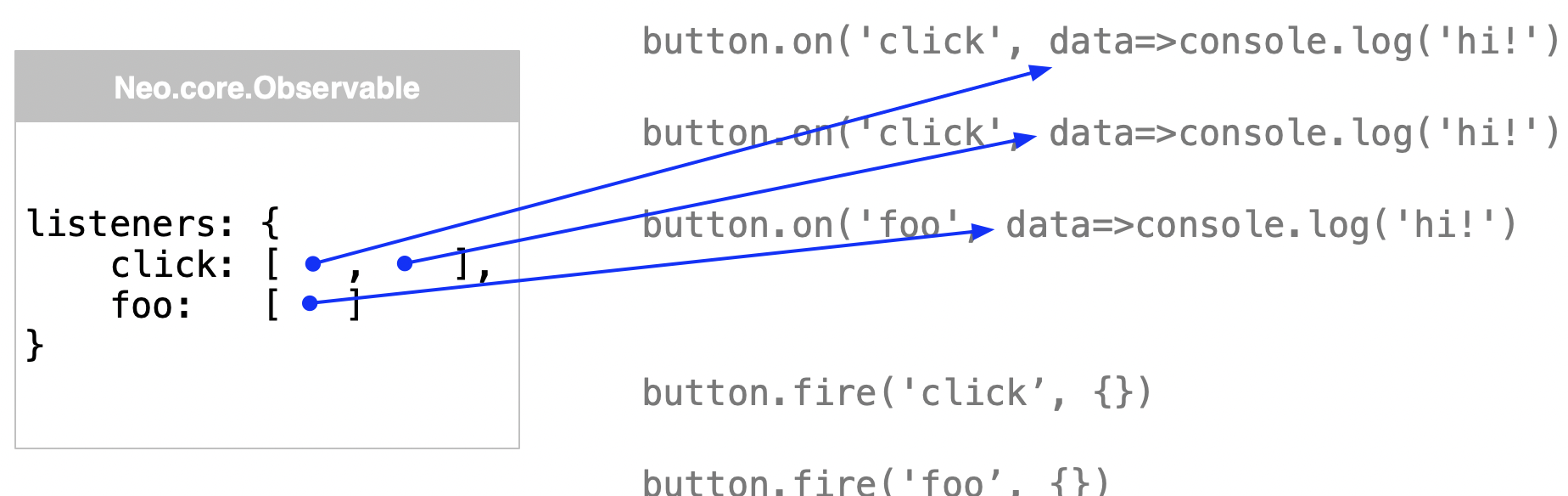
Neo.mjs has a Neo.core.Observable class that can be mixed into any class. It maintains
a listeners object map that's a key-value pair, where the key is the event name, and
the value is an array of function references. The first time a listener is added, an
entry is added to the map using the event name as the key, and the event handler added
as the first item in the associated array. If another listener is added for the same
event, a second item is added to the array. If a new event is added, a new entry is
added. Etc. When the event is fired, Neo.mjs looks up the map entry for the event name,
then runs each function in the array, passing whatever data is specified in the call to fire().