Frontmatter
| id | 651 |
| title | Demo App breaks with uBlock Origin enabled |
| state | Closed |
| labels | bugstale |
| assignees | [] |
| createdAt | May 28, 2020, 11:02 AM |
| updatedAt | Sep 27, 2024, 4:34 AM |
| githubUrl | https://github.com/neomjs/neo/issues/651 |
| author | Stuart98 |
| commentsCount | 13 |
| parentIssue | null |
| subIssues | [] |
| subIssuesCompleted | 0 |
| subIssuesTotal | 0 |
| blockedBy | [] |
| blocking | [] |
| closedAt | Sep 27, 2024, 4:34 AM |
Demo App breaks with uBlock Origin enabled

Thanks @Stuart98!
Will take a look into it once I find some free time. Working on the v1.2.0 release announcement.
Do you know by chance if there is a way to detect browser addons like this one inside the JS scope?
Best regards, Tobas

Yea, I guess it's not critical but I worry some people will see a blank screen and then just bounce.
The only way I've seen is by essentially trying to load a ad-like file (script named ads.js, image named ads.jpg or whatever) and detect failure. Not 100% reliable or elegant.
Perhaps a more robust solution is to be able to flag scripts as 'optional' and allow the app to continue even if they fail to load?
Refs: https://github.com/sitexw/BlockAdBlock/blob/master/blockadblock.js https://stackoverflow.com/questions/4869154/how-to-detect-adblock-on-my-website
Looking at your console error: It actually fails loading the addon chunk itself.
https://github.com/neomjs/neo/blob/dev/src/main/addon/GoogleAnalytics.mjs
So this is before the addon would try to add the real GA script. I guess just using the name "GoogleAnalytics" already is too much. Otherwise there would be no blank page.
Worth a ticket on their end: imagine creating an app for GA statistics...
lol, right. They must have to use some cryptic naming.

Clearly the bug is here and not upstream. Failure to load tracking shouldn't crash the demos. I don't think GA is a hard requirement for the framework or the demos.
uBlock Origins is working as intended. Someone using such add-on most likely wouldn't create an app for GA or use one. At least not as a default scenario, of course people can always add an exception.
I understand your frustration with the name based blocking, but that's just how things are done in ad blockers. If you call it an ad or GoogleAnalytics it's going to get blocked.
Welcome @MaikuMori,
I just installed uBlock Origin, to take a quick look into it.
The non dist versions (section 3 at the bottom => development mode) do work fine using the addon in Chrome:
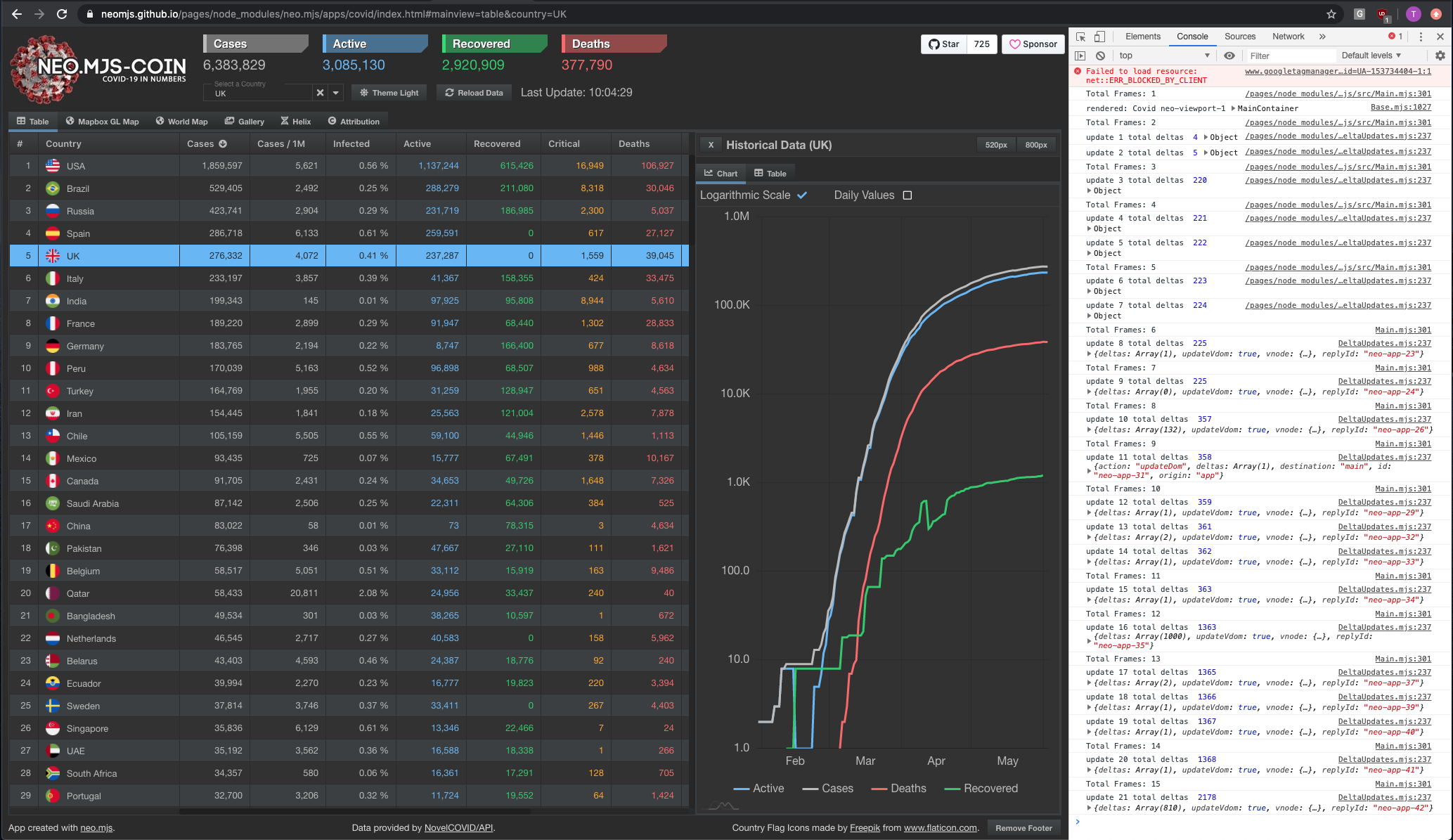
The webpack related build processes will rename the main thread addon file from "GoogleAnalytics.mjs" into "GoogleAnalytics-mjs.js".
Now this file does get blocked and it really should not. What I am planning to do is to enhance the GA main thread addon, so that it can ask a user if it is ok to use GA or not. This does require modal dialogues which require finishing the DD implementation (an epic). However, if uBlock Origin blocks the main thread addon itself in the dist env, even the logic to ask the user for his / her permission would not work.
Maybe renaming the file to something like "AnalyticsByGoogle" might already fix it, worth a test. Hoping that Google won't get mad about it.
Under the hood:
https://github.com/neomjs/neo/blob/dev/src/Main.mjs#L151
The main thread is collecting all main thread addons into an array of dynamic import statements which then gets executed via Promise.all().
Once all optional dependencies are in place, main can tell other workers that it is ready. The App launch will get delayed up to this point, since addons can expose methods to other workers. Since devs are supposed to rely on these methods being available right from the start, it does make sense.
Unrelated to the online examples, the real deal starts once devs / companies want to use the GA main thread addon for their own apps.
I will test if changing the name fixes the webpack based dist versions now.
Best regards, Tobias
the change looks very promising:

Created a new version for it (v1.2.2) and will deploy it to the github pages once i am in luck to publish the release on npm. The usual timeout madnes...
npm notice === Tarball Details ===
npm notice name:          neo.mjs
npm notice version:       1.2.2
npm notice package size:  13.6 MB
npm notice unpacked size: 16.2 MB
npm notice shasum:        1cf5baaffddb2ae97d8bc80a417ccc9d46d221af
npm notice integrity:     sha512-jIzNHFnZwa3ss[...]SonOWXRXD0zBA==
npm notice total files:   1740
npm notice
npm ERR! network timeout at: https://registry.npmjs.org/neo.mjsnpm ERR! A complete log of this run can be found in:
npm ERR!     /Users/tobiasuhlig/.npm/_logs/2020-06-02T09_31_34_908Z-debug.log
had to upgrade to v1.2.3 to adjust the createApp program as well.
the online examples (gh pages) are using v1.2.3 now as well.
Did a quick test using uBlock Origin and it does look fine now for me.
It would be nice, if you could double-check this!
@tobiu thanks for looking into this. The demos are working for me now.
So the ad blocker is actually taking a middle ground of not blocking the .js, but blocking .mjs because it doesn't recognize it as a JavaScript file. You could definitely argue that this is a bug in the uBlock.
nice that it does work for you now. it is the other way around: the .mjs file did not get blocked, the .js file was.
Then I'm confused :).
So their stance is to block .js files with that name, but for example not block images with that name. I'm assuming that they just different between JS and non-JS files. I guess that also makes sense.
@github-actions - 2024-09-13T02:31:28Z
This issue is stale because it has been open for 90 days with no activity.
- 2024-09-13T02:31:29Z @github-actions added the
stalelabel
@github-actions - 2024-09-27T02:34:45Z
This issue was closed because it has been inactive for 14 days since being marked as stale.
- 2024-09-27T02:34:46Z @github-actions closed this issue
Describe the bug The demo application (https://neomjs.github.io/pages/node_modules/neo.mjs/dist/production/apps/covid/index.html#mainview=table) does not load when uBlock Origin browser extension is enabled in Chrome.
uBlock is blocking the Google Analytics scripts from loading which causes the app to bail out.
To Reproduce Steps to reproduce the behavior:
Expected behavior The app should load and show correctly.
Screenshots If applicable, add screenshots to help explain your problem.
Desktop (please complete the following information):